
How to ensure the safety of a laptop?
Properly Utilizing Security Locks
Many electronic devices are equipped with security locks. You'll likely find one on your laptop. They're frequently used at product launches, new device demonstration sites, and mobile phone stores to ensure that exhibits and demo units aren't easily lost.
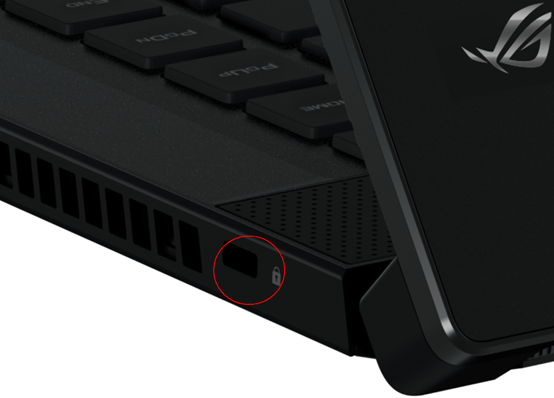
How exactly should a security lock be used?
Purchase a suitable laptop security lock.
Taking Lenovo ThinkPad series laptops (such as ThinkPad X1 Carbon, T14, etc.) as an example, most models are equipped with a physical security lock slot, which uses a standard Kensington lock slot, and the lock slot size is usually 7×3 mm. When users have security needs in public places (such as libraries, conference rooms, and laboratories), they can purchase a lock that meets this standard. For example, searching for "laptop security lock" on major shopping websites will yield many compatible products, which are usually inexpensive and widely available.
Use the laptop locks according to the instructions.
Security laptop locks come in combination and key types, and are usually very easy to use; instructions are generally included with the purchase. For example, with a laptop and combination lock, simply connect the laptop to an object that is not easily moved and set a combination, or simply lock it.
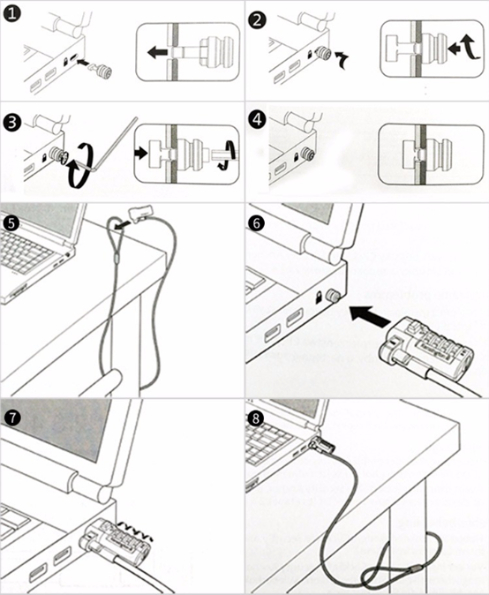
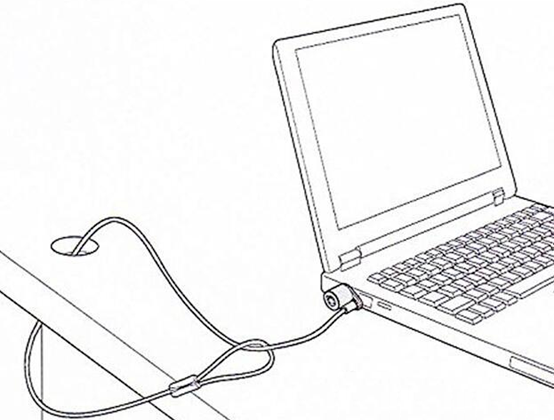
It is important to note that you should not connect the laptop to a table leg that can be lifted, otherwise you will unlock it by moving the laptop next to the table leg and lifting the table leg (instead, it should be done as shown in the picture).


News